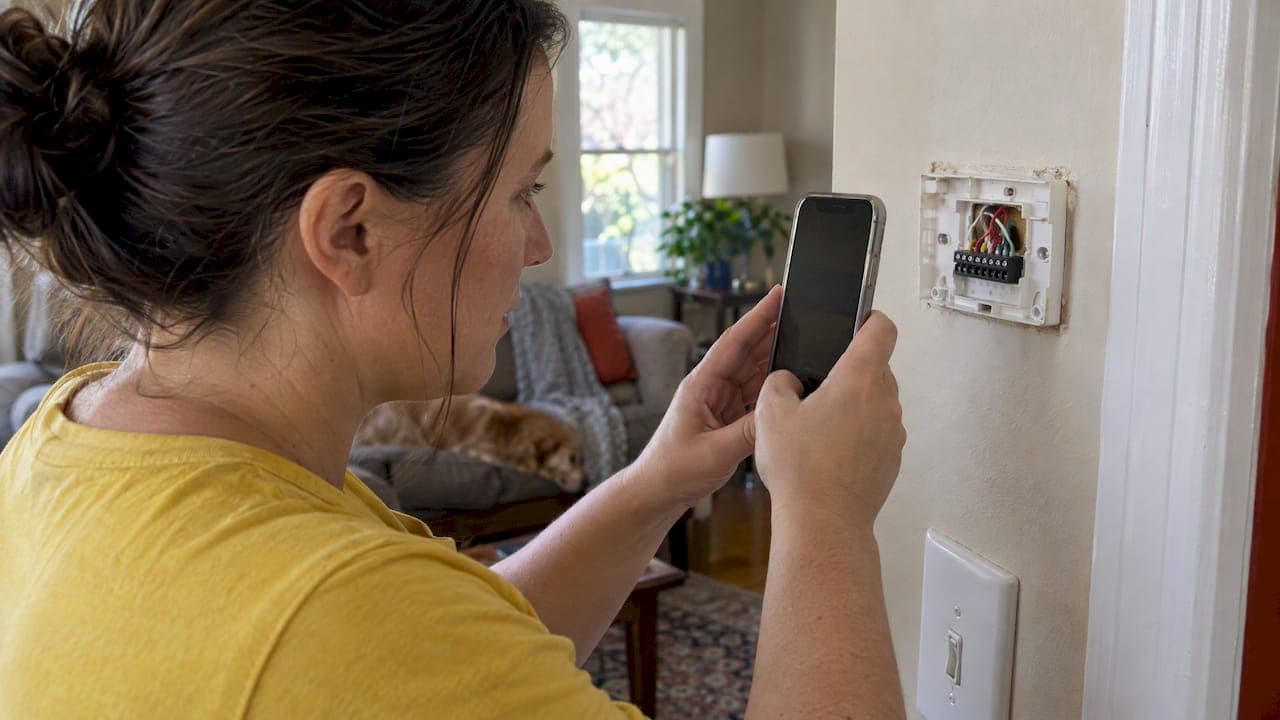
Most smart thermostats work with standard 24 VAC heating and cooling systems, so if you see an R wire and a C wire behind your current thermostat, you're probably in good shape. They generally aren't compatible with high-voltage electric baseboard or millivolt systems. Your first move: pull off the thermostat cover and look at the wiring, or run an online compatibility checker before you buy anything.
TL;DR:
- Manufacturer compatibility checkers use terminal labels and system type to generate wiring diagrams, but they may miss proprietary controls or separate zone panels.
- Shut off system power before inspecting wires, photograph terminal labels, and verify R to C voltage near 24 volts only if you have a multimeter.
- Without a C wire, power stealing can cause flickering displays or wireless drops; a dedicated wire is most reliable, while an adapter avoids new cable.
- Use a licensed technician for dual fuel systems, multiple transformers, communicating controls, or zone panels, where standard wiring diagrams may not cover equipment logic.
- Check smart home platform support separately from HVAC wiring, because thermostat compatibility with a furnace does not guarantee integration with Alexa, Google Home, or Apple HomeKit.
Table of Contents
- How to use an online compatibility checker and what it will tell you
- Step-by-step wiring inspection homeowners can safely do
- Systems that usually aren't compatible and the wiring signs to watch for
- Why the C wire matters and homeowner-friendly options if you don't have one
- When to hire a professional and how to prepare for the visit
- Integration with home automation platforms and voice assistants
- The impact of legacy thermostats on smart thermostat installation
- Compatibility considerations for multi-zone and multi-stage HVAC systems
- Technician perspective from Mystic Valley (field notes and tips)
- How Mystic Valley Home Services can help with thermostat installs and wiring
- FAQ
- Sources
- Downloadable wiring guides and official compatibility checkers
How to use an online compatibility checker and what it will tell you
A compatibility checker is the fastest way to find out if a specific thermostat model will work in your home before you spend money. Most tools from major manufacturers ask for a photo of your current thermostat's terminal block, or a typed list of which wires connect to which labeled terminals, plus your system type (gas furnace, heat pump, boiler, central AC).
Nest's compatibility checker and similar tools from other brands use that information to generate a custom wiring diagram showing how to connect the new thermostat. These checkers are reliable for standard forced-air and hydronic setups, but they often struggle with proprietary communicating systems or homes with a separate zone relay panel, where the logic lives outside the thermostat itself.
To get a usable result:
- Remove the thermostat cover first so the wire labels are visible, not hidden behind the faceplate.
- Take the photo straight on, in good light, close enough to read each letter printed on the terminal block.
- List wires by terminal letter, not by wire color, since color coding isn't standardized across manufacturers.
Step-by-step wiring inspection homeowners can safely do
Before you touch any wiring, shut off power to your heating and cooling system at the breaker or the dedicated switch near the furnace or air handler. Thermostat circuits run on low voltage, but you still want the system fully off while you work.
- Pop off the thermostat cover and take a clear photo of the wiring before you disturb anything.
- Identify each terminal: R or Rc/Rh (power), C (common), W (heat), Y (cooling), G (fan), O/B (heat pump reversing valve), Aux/E (auxiliary or emergency heat), and L (indicator light on some systems).
- Note whether the wires are stranded or solid copper, since some smart thermostats specify a wire gauge for reliable connections.
- If you have a multimeter, set it to AC voltage, touch the leads to the R and C terminals with the system power back on, and confirm you read close to 24 volts. A steady reading in that range confirms a working low-voltage circuit; a reading near zero or wildly fluctuating suggests a wiring or transformer problem.
- Turn the system power back off before photographing the final terminal layout for your records.
Pro Tip: Label each wire with painter's tape and a marker before disconnecting anything. It takes thirty seconds and prevents a frustrating guessing game later.
Once you have clean photos of the terminal block, labeled wires, and (if possible) a voltage reading, you have everything a compatibility checker or a technician needs to give you a fast, accurate answer. Our guide on safe checks to run before calling a pro walks through a few more troubleshooting steps if your current thermostat is acting up rather than simply old.
Systems that usually aren't compatible and the wiring signs to watch for
Not every heating or cooling system is built for a standard smart thermostat, and the wiring itself usually gives it away.
- High-voltage electric baseboard heat uses thick gauge wires rated for 120 to 240 volts, often connected with wire nuts instead of screw terminals, and it will damage a standard low-voltage smart thermostat if connected directly.
- Millivolt systems, common in some gas wall heaters and older floor furnaces, typically run only two wires and don't supply the 24 VAC that most smart thermostats need to operate.
- Proprietary or communicating systems, which some newer high-efficiency furnaces and heat pumps use, often have non-standard terminal labels or a microcontroller-based control board instead of a simple relay setup, and standard compatibility checkers may flag these as unsupported.
- Zone panels and relay boxes, which split one furnace or AC unit into multiple zones, usually require wiring changes at the panel itself rather than just swapping the wall thermostat.
If any of these describe your setup, a standard DIY install isn't the right path, and a wiring diagram alone won't resolve it safely.
Why the C wire matters and homeowner-friendly options if you don't have one
The C wire, short for "common," provides a stable return path for 24 VAC power, and it's what lets a smart thermostat run its Wi-Fi radio, display, and sensors continuously without draining a battery. Systems without a C wire sometimes rely on a technique called power stealing, borrowing tiny amounts of current from other wires, which can work but tends to cause display flickering, delayed responses, or dropped Wi-Fi connections over time.
According to Sensi's support documentation, when a control circuit can't supply stable 20 to 24 VAC, thermostat batteries can drain and the unit may shut down, which is why adding a C-wire or a power connector is often the fix installers recommend.
One line matters more than the rest of the wiring: a dedicated C wire resolves power issues that no software update ever will, according to Sensi's common wire guide.
If you don't already have a C wire, you generally have a few options:
- Run a new dedicated C wire from the furnace or air handler to the thermostat, which is the most reliable fix but usually requires pulling wire through walls.
- Install a power extender kit (PEK) or C-wire adapter at the equipment, which creates a C wire using your system's existing wiring without running new cable.
- Add a small transformer dedicated to the thermostat circuit, used less often but sometimes necessary on older or unusual systems.
Running new wire or installing a transformer is a job most homeowners hand off to a professional, while a basic adapter kit is sometimes DIY-friendly if you're already comfortable with the wiring steps above.
When to hire a professional and how to prepare for the visit
Some setups are better left to a licensed technician, both for safety and so the thermostat actually works the way it should.
- Call a professional for dual-fuel systems (a furnace paired with a heat pump), multi-transformer setups, or homes with a zone-control panel.
- Call a professional if your thermostat uses a proprietary or communicating protocol rather than standard R, C, W, Y, G terminals.
- Call a professional any time you're not comfortable checking for 24 VAC yourself or opening up equipment near a breaker panel.
Before the visit, have your wiring photos ready, along with your furnace, boiler, or air handler's model number and a written list of which wire goes to which terminal. That prep alone can cut real time off the diagnostic portion of the visit.
A technician will typically verify the transformer is supplying correct voltage under load, confirm or add a C-wire connection or power connector, check staging on multi-stage equipment, and test full system operation before leaving. Google's Nest support documentation specifically recommends professional installation for dual-fuel and multi-transformer setups rather than a DIY attempt.
Integration with home automation platforms and voice assistants
Compatibility with your HVAC wiring is only half the picture. Most smart thermostats also connect to a home automation ecosystem, like Amazon Alexa, Google Home, or Apple HomeKit, and that connection works independently of how your furnace or boiler is wired.
Once a thermostat is correctly wired and online, pairing it with a voice assistant typically happens through an app, using your home Wi-Fi network rather than the low-voltage thermostat wiring. This means a thermostat can be fully wiring-compatible with your HVAC system but still require checking a separate compatibility list for your preferred smart home platform, since not every model supports every assistant equally.
If you're building out a broader smart home setup, it's worth checking whether your thermostat choice supports routines and schedules through the platform you already use for lights, locks, or security cameras, since switching ecosystems later usually means reconfiguring everything. Multi-zone homes benefit especially from this kind of integration, since voice or app control lets you adjust individual zones without walking to each wall unit. The wiring compatibility work you do up front, confirming the R, C, and other terminals, is what makes this layer possible at all; without stable power at the thermostat, the smart features won't run reliably regardless of which assistant you choose.
The impact of legacy thermostats on smart thermostat installation
An older thermostat, especially one from a system that's fifteen or twenty years old, can complicate a smart thermostat swap in a few predictable ways. Some legacy systems were wired with only the minimum terminals needed for basic heating and cooling, which means there may be no C wire at all, no matter how the new thermostat is configured.
Older mercury-switch thermostats in particular sometimes used a different kind of low-voltage control that doesn't map cleanly onto modern terminal labeling, so the wires you find may not match the letters on a new thermostat's base plate. In these cases, the photo-and-label approach from the wiring inspection section becomes even more important, since a compatibility checker can only work with what it's shown.

Legacy systems also sometimes used jumper wires between terminals, for example a jumper between R and Rc on a system with a single transformer, that need to be preserved or removed correctly depending on the new thermostat's design. Removing a jumper without understanding its role in the circuit is a common cause of a heating or cooling system not turning on after a swap. This is one of the more frequent reasons a straightforward-looking DIY install ends up needing a follow-up call to a professional, particularly on systems old enough that the original installer is no longer around to ask.
Compatibility considerations for multi-zone and multi-stage HVAC systems
Multi-zone systems, which use separate thermostats or dampers to control temperature in different parts of a home, add a layer of complexity that a single-zone compatibility checker doesn't always account for. Each zone typically has its own thermostat wiring, but they often share a single transformer and a central zone control panel, which means changing one thermostat can sometimes affect how the whole panel reads signals from the others.
Multi-stage systems, where a furnace or heat pump has more than one level of heating or cooling output, require a thermostat that specifically supports multi-stage control, since a basic single-stage thermostat will only ever call for the first stage. Resideo's technical literature for the T10 Pro documents specific wiring arrangements for heat pump configurations and notes when separate transformers or slider-tab settings are required; this is the kind of detail that matters most on these setups.
If your home has either of these configurations, a wiring photo and terminal list become even more valuable, since a zone panel or multi-stage control board often has labels that don't match a standard single-zone wiring diagram. Our cooling and multi-zone services page covers how multi-zone system design is typically handled when wiring changes go beyond a simple thermostat swap.

Technician perspective from Mystic Valley (field notes and tips)
The most common mistake we see is a homeowner connecting a jumper wire to the wrong terminal after removing an old thermostat, which stops the system from calling for heat or cooling at all. A proper C wire, run correctly the first time, consistently prevents the dropout and battery issues that bring people back for a second visit. Before we arrive, we ask for clear photos of the existing wiring and the furnace or boiler's model number, since that single step often cuts the visit time in half.
— Matt
How Mystic Valley Home Services can help with thermostat installs and wiring
If your wiring inspection turns up a missing C wire, a zone panel that needs attention, or boiler wiring that doesn't match any diagram you can find online, we handle that work directly rather than leaving you to sort it out alone.

- Thermostat and zone valve replacement, including C-wire installation where it's missing.
- Zone troubleshooting on multi-zone systems that share a single transformer.
- Boiler and furnace wiring diagnostics for systems with no clear diagram on file.
Technicians quote the job with transparent pricing before any work starts, so there are no surprises once the wiring is open. You can book a visit through our heating services page and get a same-day or next-day appointment depending on your location.
FAQ
Can you put a smart thermostat on any thermostat?
No. A smart thermostat generally only works on systems that supply standard 24 VAC low-voltage control wiring, which rules out high-voltage electric baseboard heat and most millivolt systems. Checking your wiring terminals or running a manufacturer compatibility checker before buying is the safest way to confirm fit.
What should I check before buying a smart thermostat?
Look behind your current thermostat for an R terminal and, ideally, a C terminal, since those confirm a standard 24 VAC system. If you don't see a C wire, the thermostat may still work using a power extender kit, but it's worth confirming with a compatibility checker first.
Do smart thermostats work with any HVAC system?
Most 24 VAC forced-air, boiler, and heat pump systems are compatible, according to Resideo's technical documentation, but electric baseboard and millivolt systems typically are not. Proprietary communicating systems and homes with complex zone panels also sometimes fall outside standard compatibility.
What does it mean if my thermostat isn't compatible with my wiring?
It usually means your system is missing a required terminal, most often the C wire, or it uses a type of control, like millivolt or high-voltage baseboard, that a standard smart thermostat isn't built for. Google's Nest support page recommends a compatibility check first and a professional installation for more complex wiring situations.
Is it safe to check my own thermostat wiring?
Checking wiring is safe if you shut off power to the system at the breaker first and avoid touching bare wires with the power on. If you're not comfortable reading a multimeter or opening equipment near a breaker panel, it's better to have a licensed technician handle the inspection.
Sources
- What is a common wire? — Sensi (Copeland) support
- T10 Pro Smart Thermostat with RedLINK™ — Resideo technical literature (TechLit)
- Nest thermostat compatibility — Google Home and Nest Help
Downloadable wiring guides and official compatibility checkers
Before buying or installing, it's worth checking these directly against your own system rather than relying on general advice:
- Nest thermostat compatibility checker, which generates a wiring diagram from your photo or wire list.
- ecobee's thermostat compatibility checker, useful for cross-checking results against a second manufacturer's tool.
- Resideo's T10 Pro technical literature, which documents detailed wiring arrangements for heat pump and multi-stage systems.
These are manufacturer-published tools and documentation, so they reflect the actual terminal logic built into each thermostat rather than general assumptions about wiring.
For broader troubleshooting and indoor air quality context, our partner guide on fast fixes and when to call a pro and this piece on smarter HVAC airflow offer additional homeowner-facing perspective.