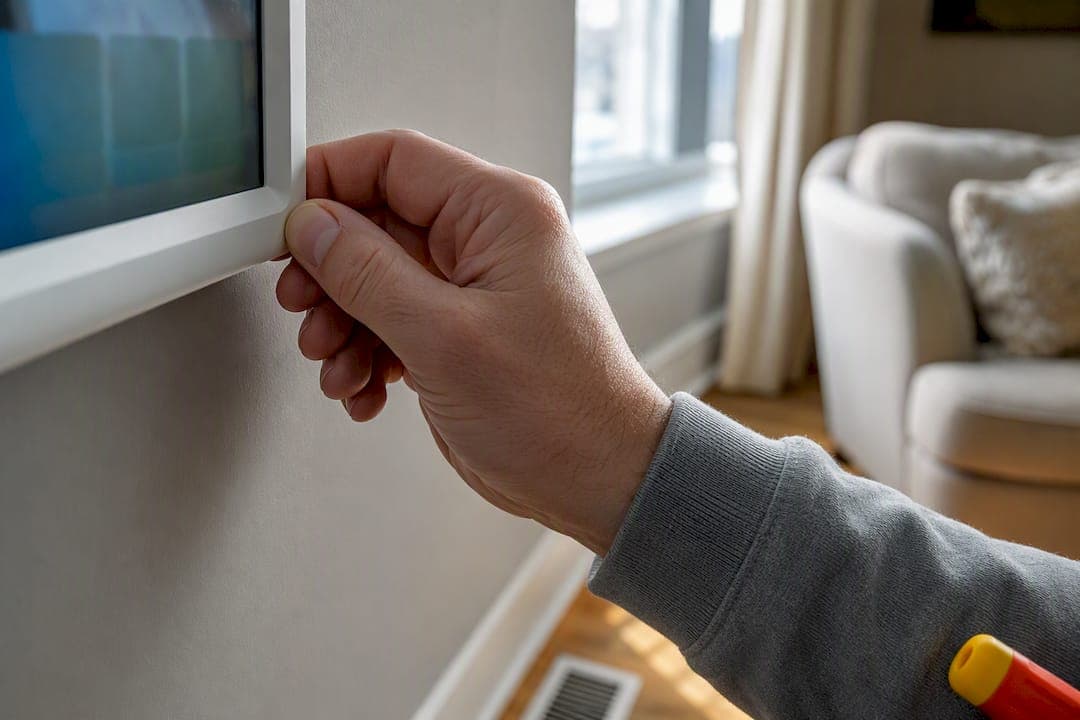
Try three things first: replace the batteries, check the HVAC breaker and furnace switch, and confirm the thermostat mode and setpoint are actually calling for a temperature change. Most blank or unresponsive thermostats trace back to a power interruption somewhere between the wall unit and the furnace, not a broken thermostat itself. If the display stays dark or you smell gas or see scorch marks anywhere near the unit, stop troubleshooting and call a licensed technician.
TL;DR:
- Most thermostat power issues stem from upstream power loss, such as tripped breakers, blown fuses, or disconnected furnace switches, rather than a faulty thermostat module.
- Routine checks like replacing batteries, resetting the breaker, confirming the furnace door is latched, and setting the correct mode resolve the majority of unresponsive thermostats within minutes.
- A blank display almost always indicates an electrical fault upstream, with common causes including weak batteries, tripped breakers, or blown low-voltage control fuses in the furnace.
- If the thermostat appears powered but the system does not respond, verify mode and setpoint accuracy, and check for relay clicks; absence may point to wiring issues or blown fuses inside the equipment.
- Persistent issues like repeated breaker trips, burning smells, gas odors, or complex wiring problems require professional HVAC service to ensure safety and proper repair.
Table of Contents
- 5-Minute Safe Checklist Every Homeowner Should Run First
- Troubleshooting by Symptom: Blank, Unresponsive, Wrong Temperature, or Short Cycling
- Smart Thermostat Power and Connectivity Problems
- Basic Wiring Checks You Can Safely Make (And What to Leave Alone)
- What You Can Fix in 5, 15, and 30 to 90 Minutes
- When Should You Call a Licensed HVAC Technician?
- Field Perspective: What Technicians Actually Find on First Visits
- How Mystic Valley Home Services Handles Thermostat and Heating Calls
- Where to Learn More
- Sources
- FAQ
5-Minute Safe Checklist Every Homeowner Should Run First
Before assuming your thermostat is dead, run through this sequence in order. Each step takes under a minute, and most no-power complaints resolve somewhere in this list.
- Swap the batteries. Even thermostats that look "hardwired" often run on AA or AAA batteries for backup. Pop out the old ones, check the polarity markings inside the compartment, and press the display firmly back into its base afterward. A loose click-fit is a surprisingly common reason a fresh battery swap doesn't seem to work.
- Find your HVAC breaker. It's usually labeled "furnace," "AC," or "HVAC" in your panel. Flip it fully off, wait ten seconds, then flip it back on. If it trips again immediately, stop. That's an electrical fault, not something to keep resetting.
- Check the furnace or air handler service switch. This looks like a light switch mounted on or near the unit and gets bumped off more often than people realize, especially in basements used for storage.
- Confirm the access panel is fully seated. Furnaces have a door safety switch that cuts power the instant the panel isn't latched flush, which mimics a dead thermostat perfectly.
- Set the mode correctly and nudge the setpoint. Push the temperature noticeably past the current room reading in the direction you want (up for heat, down for cooling), then wait.
That last step matters more than people expect. Many systems, especially anything with a compressor, build in a protection delay before responding to a new call for heat or cooling, so give it a full five minutes before deciding nothing happened.
Pro Tip: Write down what the display showed before you touched anything: a blinking icon, an error code, or just black. If you end up calling a technician, that detail alone can save fifteen minutes of on-site diagnosis.
Troubleshooting by Symptom: Blank, Unresponsive, Wrong Temperature, or Short Cycling
Different symptoms point to different failure points. Matching what's on your screen to the right diagnostic path saves you from replacing parts that were never broken.
A completely blank display
A dark screen is almost never the thermostat module itself failing. It's a symptom of something upstream losing power, and Honeywell's own troubleshooting data backs this up: blank displays trace most often to weak batteries, a tripped breaker, an open furnace panel, or a blown control-board fuse, rarely a dead thermostat.
Work through it in this order:
- Confirm batteries are fresh and seated correctly.
- Reset the breaker once, not repeatedly.
- Check that the furnace door safety switch is engaged (panel closed and latched).
- Reseat the thermostat faceplate onto its wall backplate. It's easy to leave one tab unclipped.
- If all of that checks out, the next likely culprit is a blown low voltage fuse on the furnace control board, typically a small standard fuse that's inexpensive but requires opening the furnace cabinet to inspect.
That control-board fuse is worth understanding because it's the point where DIY usually ends. Testing or replacing it means working inside a live furnace cabinet, and unless you're comfortable with a multimeter and know exactly which fuse you're looking at, this is where a technician earns their visit.
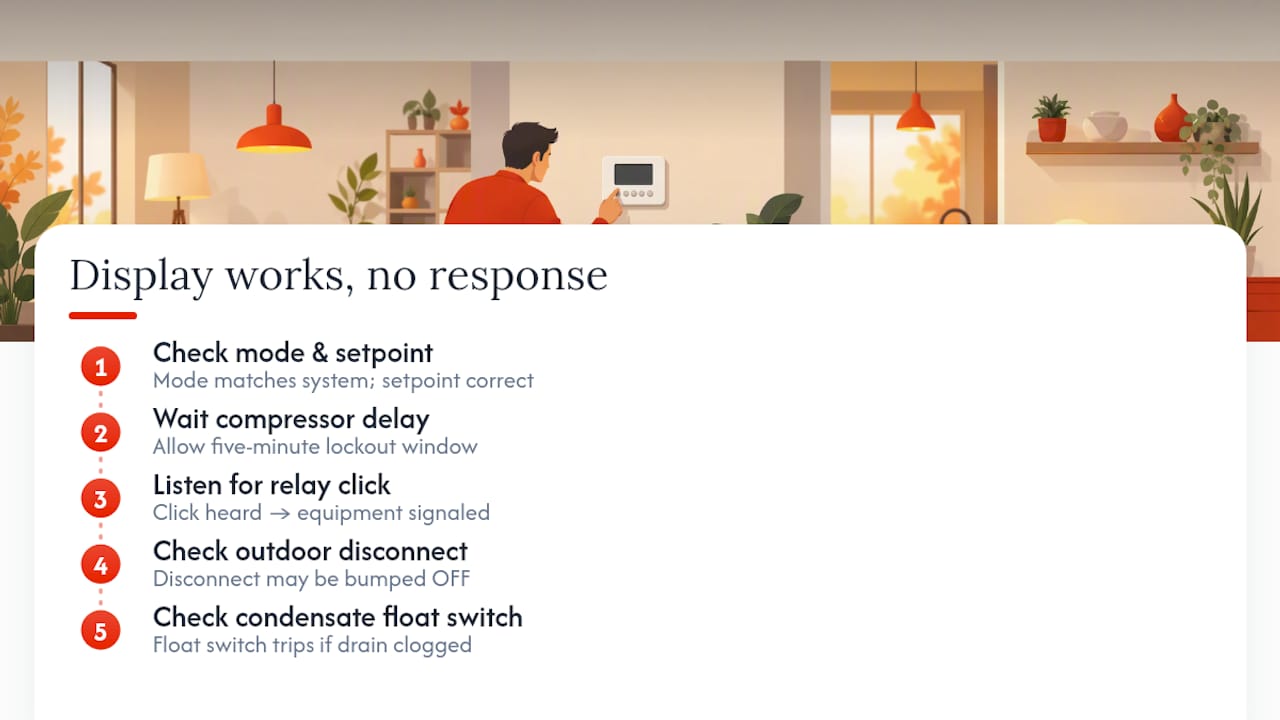
Display works but the furnace or AC won't respond
This is a different animal from a blank screen. The thermostat has power and looks normal, but nothing downstream reacts. Start by double-checking mode and setpoint. It sounds obvious, but "Cool" mode set below room temperature while your furnace is what's actually running is a common mismatch after a battery change resets defaults.
If mode and setpoint check out, give it the five-minute compressor delay window. Central air systems in particular protect their compressors with a short lockout after any call for cooling, so an immediate non-response isn't necessarily a fault.
Beyond that, listen for a faint click near the furnace or outdoor unit when you adjust the setpoint. That click is a relay engaging. Hearing it and still getting no airflow or no compressor points toward the equipment side, not the thermostat. No click at all often means the low-voltage signal isn't reaching the equipment, which circles back to wiring or a control-board fuse.
Two other quick checks belong here. Outdoor AC units have a disconnect box, often gray and mounted on the exterior wall near the condenser, that sometimes gets bumped or shut off during yard work. And many furnaces and air handlers include a condensate float switch that trips when a drain line clogs, deliberately shutting the system down to prevent water damage. Field technicians run into tripped float switches constantly on calls where the thermostat itself is completely fine but the unit is blocked downstream.
Temperature readings that don't match the room
If your thermostat says 68 but the room feels closer to 63, the sensor itself may be misreading rather than failing outright. Placement is the usual suspect: thermostats mounted near a drafty doorway, in direct afternoon sun, above a heat register, or on an exterior wall will consistently misread the actual living space temperature.
Dust buildup on the internal sensor can also skew readings a degree or two over time, and older mechanical or early digital thermostats are known to drift as their internal components age. If cleaning and relocating away from obvious heat or draft sources doesn't fix it, and the unit is more than ten years old, replacement is usually more cost-effective than continued troubleshooting.
Short cycling: turning on and off too fast
Short cycling, where your heat or AC kicks on for a couple of minutes and shuts off repeatedly, can originate from either the thermostat or the equipment, and telling them apart matters.
A thermostat-caused short cycle usually comes from bad sensor placement causing the unit to satisfy the setpoint too fast, or from an aging thermostat with drifting internal calibration. An equipment-caused short cycle, by contrast, often points to a dirty air filter restricting airflow, a failing flame sensor on a furnace, or a refrigerant issue on the cooling side. Heating and cooling account for a substantial share of typical home energy use, so a system that's short cycling isn't just annoying. It's actively wasting energy every time it restarts.
If short cycling started right after you replaced batteries or moved the thermostat, suspect the thermostat first. If it's been building gradually over weeks with no changes on your end, suspect the equipment and consider a professional inspection before it strands you without heat in January.
Smart Thermostat Power and Connectivity Problems
Smart thermostats fail differently than the mechanical dial your parents had, mostly because they need continuous power to run a screen, Wi-Fi radio, and internal battery, not just a momentary signal.
- Missing C-wire is the top cause of "no power" on smart models. Many older homes were wired with just R, W, Y, and G wires for a basic thermostat, no C (common) wire for constant power. ENERGY STAR's smart thermostat guidance confirms that without a C-wire or a power accessory, many smart units can't maintain steady charge, which shows up as random shutoffs or a thermostat that only half works.
- A blinking yellow light or "No system power" alert is diagnostic, not random. Nest's own support documentation ties this alert directly to the unit not receiving 24V from the HVAC system, which usually means checking the breaker, the furnace switch, and the C-wire connection in that order.
- Try a soft restart before a factory reset. Pulling the display off its base for thirty seconds and reseating it clears most software freezes. A factory reset wipes your schedule and Wi-Fi setup, so save it for after simpler steps fail.
- Wi-Fi dropouts are often the router's problem, not the thermostat's. Confirm the thermostat is within normal range of your router, double-check you're connecting to the correct SSID (2.4GHz networks work more reliably with most smart thermostats than 5GHz), and check the manufacturer's status page for a known outage before re-pairing the app.
Pro Tip: If your smart thermostat loses power on a regular daily schedule, this often indicates power supply issues. That pattern usually means it's running on battery reserve alone and draining faster than a weak C-wire connection can recharge it.
Basic Wiring Checks You Can Safely Make (And What to Leave Alone)
Cut power at the breaker before touching a single wire, no exceptions. Low-voltage thermostat wiring won't shock you the way household current will, but working blind inside a live system invites mistakes you can't easily undo.
With power off, you can safely look for wires that have slipped out of their terminal screws, greenish corrosion on a connection point, or a wire nut that's come loose. That's the extent of a reasonable visual check.
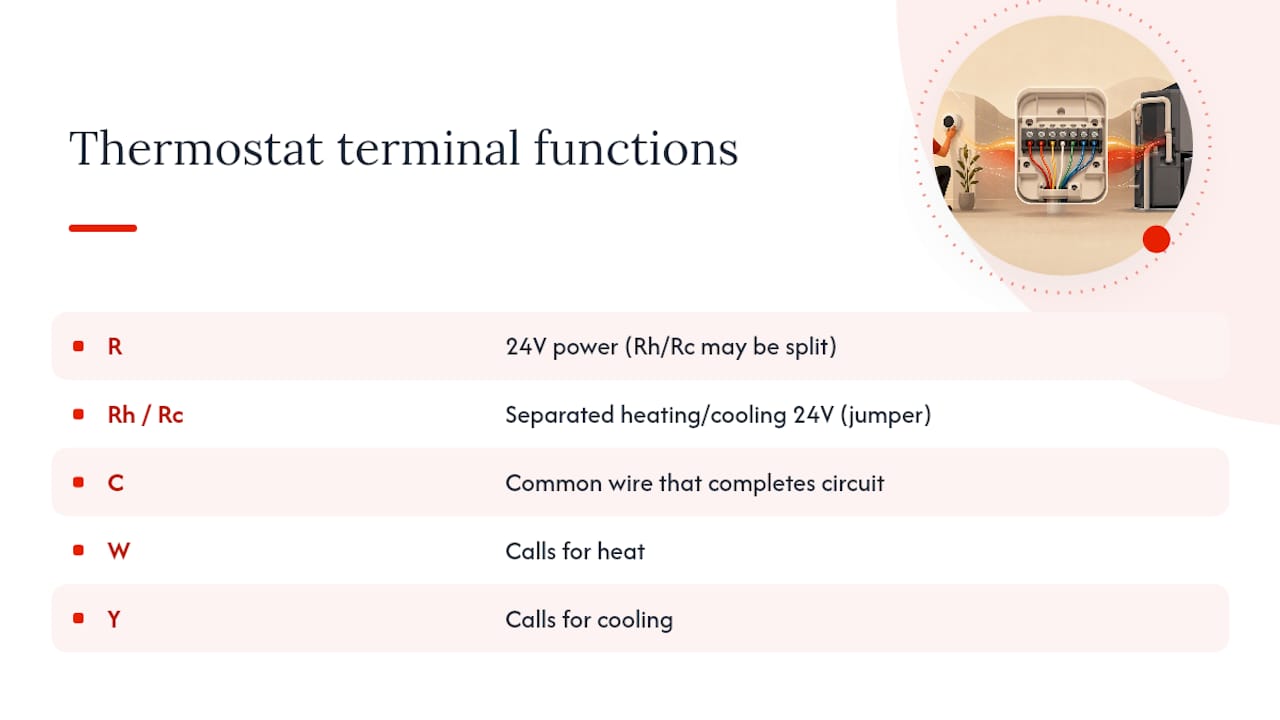
The terminal labels are worth knowing even if you never touch them: R carries 24V power, C is the common wire that completes the circuit, W calls for heat, Y calls for cooling, and G runs the fan. Some systems split R into Rh and Rc for separate heating and cooling power, connected by a small jumper wire that should never be removed unless you know exactly why.
Stop and call a licensed technician if you see burn marks, melted insulation, a breaker that trips more than once, or any smell of gas near a furnace. Those aren't troubleshooting steps anymore. They're safety issues.
What You Can Fix in 5, 15, and 30 to 90 Minutes
Not every fix takes the same effort, and knowing which bucket your problem falls into keeps you from either underreacting to a real fault or overreacting to a simple one.
- Five minutes: Battery swap, reseating the display, confirming mode and setpoint, and resetting the breaker once. This resolves the majority of blank-screen and unresponsive-display complaints on its own.
- Fifteen minutes: Checking the furnace access panel latch, testing the condensate float switch, verifying the outdoor disconnect is engaged, and doing a soft reboot of both the thermostat and your Wi-Fi router if it's a smart model. This tier catches the "thermostat looks fine but nothing runs" cases.
- Thirty to ninety minutes: A power-off visual wiring inspection, checking the furnace's low-voltage fuse, and, if you're comfortable with a multimeter, testing for 24V at the R terminal. If you reach this stage without resolution, you're looking at a service call, and it's reasonable to expect a technician visit plus any parts needed, typically a fuse or a C-wire installation, if that's the root cause.
Pro Tip: Don't keep resetting the breaker hoping it'll "take" on the third try. If it trips more than once, you've moved past troubleshooting territory and into electrical-fault territory.
When Should You Call a Licensed HVAC Technician?
Some situations aren't worth attempting yourself, either because the fix requires equipment you don't have or because the risk outweighs the savings.
- The thermostat stays completely dark after fresh batteries, a breaker reset, and a confirmed closed furnace panel.
- You suspect a blown control-board fuse, since testing it means opening a live furnace cabinet.
- The breaker trips repeatedly, or you notice any burning smell, scorch marks, or melted wiring.
- You smell gas anywhere near a furnace. Leave the house and call your gas utility or 911 first, then arrange service.
- Heating and cooling modes seem reversed, or wiring looks tangled after a recent thermostat swap you or someone else attempted.
Field Perspective: What Technicians Actually Find on First Visits
Most first-time service calls end anticlimactically: a reseated display, a closed furnace panel, fresh batteries, or a reset float switch. The genuinely stubborn cases almost always come down to a blown control-board fuse, damaged low-voltage wiring, or a missing C-wire that needs a proper install rather than a workaround. Homeowners rarely need to be told this twice once they've seen it, but it's worth saying plainly: a thermostat that looks broken is usually just a thermostat that's been cut off from power somewhere else in the chain. Chase the power first, and the actual fault tends to reveal itself fast.
— Matt
How Mystic Valley Home Services Handles Thermostat and Heating Calls
A technician can often pinpoint whether it's a blown control-board fuse, a missing C-wire, or a deeper wiring issue in one visit, instead of you guessing through parts you don't need. If you've worked through the checklist above and the thermostat still won't cooperate, or you want a smart thermostat installed correctly the first time with proper C-wire power, contacting a qualified service provider is recommended.

A typical service visit may include a full inspection of the thermostat, wiring, and furnace control board, a clear estimate before any work begins, and a safety check of the breaker and gas connections where relevant. Browse our heating and HVAC services or check areas we serve to confirm coverage near you, then request a visit when you're ready to get it fixed right.
Where to Learn More
- Energy covers setup and energy-saving settings.
- ENERGY STAR's smart thermostat FAQ explains C-wire requirements and replacement guidance.
- Manufacturer support pages, including Nest and Honeywell, cover model-specific error codes.
Sources
- Programmable thermostats | Department of Energy
- Google Nest support: troubleshoot no power / help codes
- Thermostat not working: Causes and solutions | Trane
FAQ
Is there a reset button on a thermostat?
Most thermostats don't have a dedicated physical reset button. Instead, you reset them by removing and reinserting the batteries, or on smart models, holding the menu button to access a software reset option.
How do I know if my thermostat is broken?
Check whether the display is blank, unresponsive to setpoint changes, or shows a reading far off from the actual room temperature after ruling out batteries, breakers, and furnace panel issues. If those basics check out and the problem persists, the thermostat itself, or the wiring feeding it, is the likely fault.
Why is my thermostat running but not heating?
The display working while the furnace stays silent usually points to a wiring or equipment issue downstream, not the thermostat itself, since a compressor protection delay, tripped float switch, or disconnected outdoor unit can all block a call for heat from reaching the equipment. Give it five minutes after any setpoint change before assuming it's stuck.
How do I reset an unresponsive thermostat?
Remove the display from its wall base for about thirty seconds, then reseat it. For smart thermostats, this soft restart clears most freezes without wiping your saved schedule or Wi-Fi settings, which a full factory reset would erase.